It didn’t ask me about sync way druing the initial setup. Even if it did, I could not catch it. This is the most important feature. The software began downloading TBs of Drive data. WHY? Act like the official Google drive app.
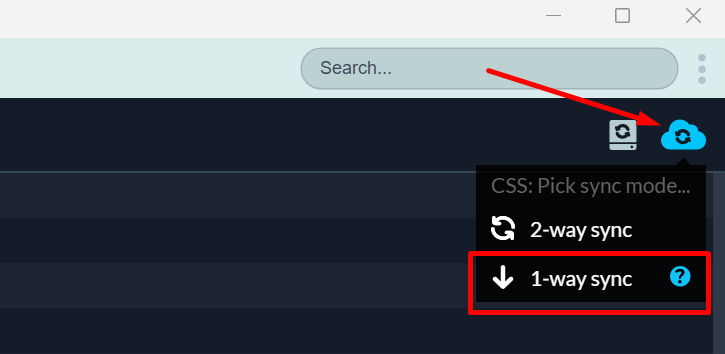
By hovering on the 1-way sync shortcut or through the Cloud Selective Sync function opens a folder dialog to select. Yet I want to disable two way sync on my existing drive folder and make it 1-way so only the files I add are uploaded.
Do you recall what steps you took before the drive folder was deleted?
There was a folder inside my deleted one and I cut and paste it elsewhere. Insync has deleted the subfolder AFAIK.
Was the Google Drive app running simultaneously?
No as the native Google Drive app does not work on linux. I would not use Insync if it was running.
And an advice: CSS, LSS… Come on. I didn’t even understand what that was in the first place.
Hi! Let me address each point again so I can streamline my responses accordingly. Apologies in advance for the lengthy post and thank you for your patience!
It didn’t ask me about sync way druing the initial setup. Even if it did, I could not catch it.
The initial setup is for 2-way sync right now, and you have a very valid feedback on this process. Thank you very much for pointing this out; I’ll forward this to our engineers as a setup improvement.
The software began downloading TBs of Drive data. WHY? Act like the official Google drive app.
Files and folders are not synced, especially during initial setup, unless users deliberately select them. You may refer to Step 4here for more information.
However, do you recall selecting an existing folder or a new (empty) folder? If it’s the former, Insync will file-match and sync whatever it sees locally. If you didn’t select an existing folder, do you recall clicking Select all during the setup process?
By hovering on the 1-way sync shortcut or through the Cloud Selective Sync function opens a folder dialog to select. Yet I want to disable two way sync on my existing drive folder and make it 1-way so only the files I add are uploaded.
Users will need to unsync the files first before changing the sync mode (i.e., 2-way → 1-way). These details are outlined on this guide.
There was a folder inside my deleted one and I cut and paste it elsewhere. Insync has deleted the subfolder AFAIK.
Was this folder/subfolder synced 2-way? If so, the cut+paste elsewhere operation is considered removing it from the sync folder, which subsequently deletes it online. Undoing the cut+paste or simply moving that folder back to the old location should restore the files in the cloud. Alternately, you can go to the Google Drive Trash folder to restore the file as well.
Lastly-- on what each feature means (CSS/LSS), you may find a more comprehensive explanation here & here.
I hope this clarifies a few more things. I’m happy to answer any follow-up questions or concerns you might have. Thank you again for the time you took to share about your experience and for sharing your honest feedback.
Yes, I selected a folder but didn’t know 2-way sync was on.
Thank you for your kind reponses. I was actually planing to buy the software but at this moment I believe it needs to be much more simple or let’s say stupid proof.
@Recep_Baltas I completely understand and respect your decision. Rest assured that your feedback has been forwarded to our team so we can remain vigilant on the much needed improvements for a more seamless experience.
Thank you once again! I hope you have a good week ahead.