OK, so I spent a little time looking at that link and I don’t think it applies to my question. Maybe I’m just being stupid here, so please bear with me.
First, a little info on my setup:
-
Everything I want synced goes to the Google cloud folder “HOME_SYNC”.
-
My local base folder is in “/home/BrianG/Insync/[redacted]@gmail.com/Google Drive/”, but there is nothing in there I am syncing.
-
Using LLS > 2-Way Sync, I added several directories from other different drives (see arrow in my pic)
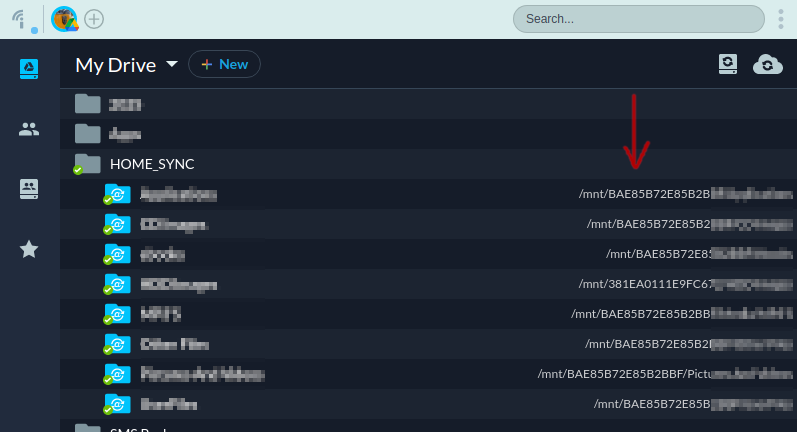
So, my questions are:
- If one of the drives (not one where my base folder is) is faulty, how would I replace the bad drive with a new one?
- I would think I would have to update the drive mapping somehow for all the drive/folders in my synced folder list (the ones in “/mnt/ABC123”)?
- Otherwise, how does Insync know how to sync, and would it just delete all my cloud files since the old faulty drive is now gone?
What I think I would have to do is:
- Click “Unsync” on the drive(s) I want to replace. If I’m not mistaken, this retains the files in the cloud; it just stops syncing from my local drive to the cloud anymore.
- Exit the Insync application.
- Copy the data from the current drive to the new drive.
- Remove the old drive.
- Start the Insync application and re-do the “LSS > 2-way sync” process for all the updated drive(s)/folder(s).
- Let the application re-upload a ton of data to the cloud, or is the application smart enough to see the files are already there (or would it duplicate everything)?