Insync 3.9.7.60031 does not start

On openSUSE Tumbleweed, launching with --no-daemon shows this:

~> insync start --no-daemon
Traceback (most recent call last):
  File "insynclinux/gui/insync.py", line 19, in <module>
  File "click/core.py", line 1157, in __call__
  File "click/core.py", line 1078, in main
  File "click/core.py", line 1688, in invoke
  File "click/core.py", line 1434, in invoke
  File "click/core.py", line 783, in invoke
  File "insynclinux/gui/cli.py", line 163, in start
  File "PyInstaller/loader/pyimod02_importers.py", line 385, in exec_module
  File "idesklinux/app.py", line 12, in <module>
  File "PyInstaller/loader/pyimod02_importers.py", line 385, in exec_module
  File "idesklinux/platui_impl.py", line 14, in <module>
  File "/tmp/embedded.qgk1netm.zip/shibokensupport/__feature__.py", line 142, in _import
  File "PyInstaller/loader/pyimod02_importers.py", line 385, in exec_module
  File "idesklinux/htmlui_impl.py", line 6, in <module>
  File "/tmp/embedded.qgk1netm.zip/shibokensupport/__feature__.py", line 142, in _import
ImportError: /usr/lib/insync/libnss3.so: version `NSS_3.117' not found (required by /usr/lib/insync/libsmime3.so)
[309633] Failed to execute script 'insync' due to unhandled exception!

BTW, the strange thing is that /usr/lib/insync/libnss3.so is present:

~> ll /usr/lib/insync/libnss3*
-rwxr-xr-x 1 root root 1363344 12 giu  2024 /usr/lib/insync/libnss3.so

…and since it apparently is part of the package, why would it be an incorrect version?

Puzzled…
Allow me to forward this to our Linux team. My apologies for the huge trouble, @Cris70 !

1 Like

Same here; Linux Mint 22.2
I reinstalled Insync: it won’t run. No warnings.

On my OpenSuse it’s seams running, but is stuck in the syncing… activity but it’s not syncing at all.

From the logs it look like an issue with wayland and some js library for the app.

js: Enqueued failed request for retry in 24000
qt.qpa.wayland: Wayland does not support QWindow::requestActivate()
js: ResizeObserver loop limit exceeded
js: Failed to load https://app.posthog.com/engage/?ip=1&_=1715278080404&ver=1.26.0: The value of the 'Access-Control-Allow-Origin' header in the response must not be the wildcard '*' when the request's credentials mode is 'include'. Origin 'file://' is therefore not allowed access. The credentials mode of requests initiated by the XMLHttpRequest is controlled by the withCredentials attribute.
js: Bad HTTP status: 0 
js: Enqueued failed request for retry in 6000
js: Failed to load https://app.posthog.com/e/?ip=1&_=1715278058789&ver=1.26.0: The value of the 'Access-Control-Allow-Origin' header in the response must not be the wildcard '*' when the request's credentials mode is 'include'. Origin 'file://' is therefore not allowed access. The credentials mode of requests initiated by the XMLHttpRequest is controlled by the withCredentials attribute.
js: Bad HTTP status: 0 
js: Enqueued failed request for retry in 24000
js: ResizeObserver loop limit exceeded

I am on Ubuntu 24.04 and have exact same issue… My linux client now crashes and InSync is totally useless…

Version: 3.9.7.60031
Platform: Ubuntu 24.04

Errors:

~$ insync resume
Traceback (most recent call last):
  File "insynclinux/gui/insync.py", line 19, in <module>
  File "click/core.py", line 1157, in __call__
  File "click/core.py", line 1078, in main
  File "click/core.py", line 1688, in invoke
  File "click/core.py", line 1434, in invoke
  File "click/core.py", line 783, in invoke
  File "insynclinux/gui/cli.py", line 78, in wrapper
TypeError: 'NoneType' object is not iterable
[242477] Failed to execute script 'insync' due to unhandled exception!

I tailed the ~/.config/Insync/out.txt file while running Insync and observed the following error leading to a crash / segfault… (redacting my filenames)

~$ tail ~/.config/Insync/out.txt --follow
...
ERROR    2025-12-07 21:06:19,167 [workbase:__run:257] While running AddLocalODItem(cl_node_id=149861)
Traceback (most recent call last):
  File "idesksync/workbase.py", line 246, in __run
  File "idesksync/syncwork.py", line 4748, in _do
  File "ideskfs/fs.py", line 302, in move_reg
  File "ideskfs/fs.py", line 288, in move_reg
  File "ideskfs/fs.py", line 280, in move
FileNotFoundError: [Errno 2] No such file or directory: '/xxx/xxxx/xxx/xxx xxx/xx/xx/xxxx/xxxxx/xxxxx/.~3168B6CEFF81657D-3168B6CEFF81657D!s48cd0a671cc845f8b1089f628222133c-e35ed7.insyncdl' -> '/xxxx/xxx/xxx/xxxx xxx/xx/xx/xx xx xx xx xx/xx xx xx/xx xx/xx xx.pdf'
js: ResizeObserver loop limit exceeded
Fatal Python error: Segmentation fault

We sincerely apologize for the huge trouble! Our engineers have been alerted so we can get to the bottom of this issue as soon as possible.

Hello everyone! Please refer to the information below.

For OpenSUSE Tumbleweed users, please send the output of this command:
zypper info insync
cat /etc/os-release

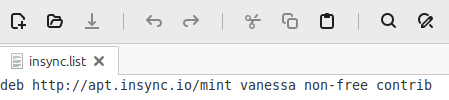
If you are on Linux Mint 22, please update your /etc/apt/sources.list.d/insync.list file by changing jammy to noble.

For Ubuntu users, send the output of:
apt info insync
cat /etc/os-release

Thank you!

Thank you for the info.
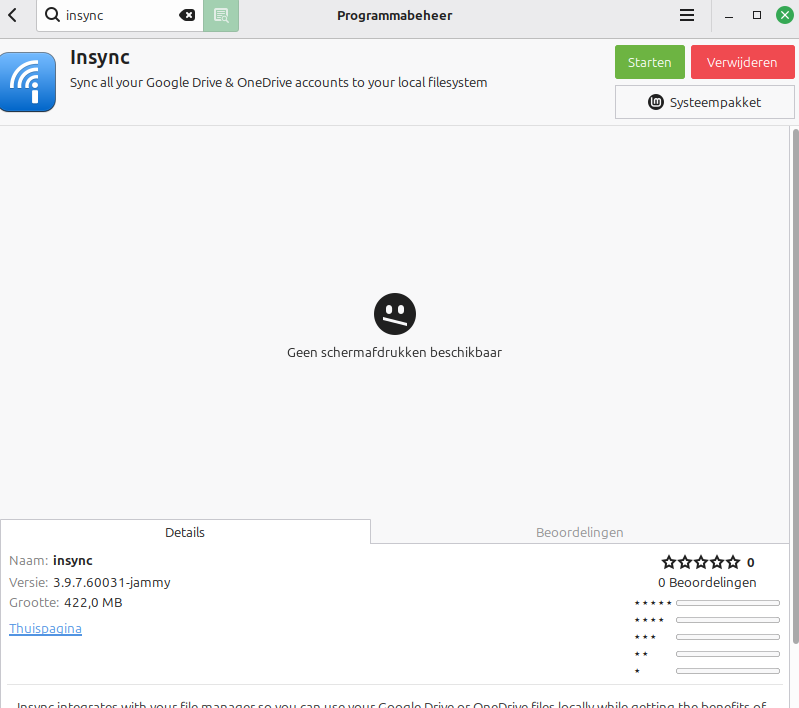
insync.list says ‘vanessa’, and current version Mint is ‘Zara’.
Besides: the file (july 24, 2024) is locked, can only be edited with root privileges. Have to figure out to handle this…
Reinstall insync did not fix it.


1 Like

Same here in fresh install of Debian 13 Trixie with KDE. Insync opens, but it is not showing anyting (blank screen). out.txt indicates Wayland does not support QWindow::requestActivate(). I’m using proprietary nvidia drivers.

Information for package insync:
-------------------------------
Repository     : insync repo
Name           : insync
Version        : 3.9.7.60031-fc41
Arch           : x86_64
Vendor         : Insync
Installed Size : 405.8 MiB
Installed      : Yes
Status         : up-to-date
Source package : insync-3.9.7.60031-fc41.src
Upstream URL   : http://www.insynchq.com
Summary        : Sync all your Google Drive & OneDrive accounts to your local filesystem
Description    :
    Sync all your Google Drive & OneDrive accounts to your local filesystem
    Insync integrates with your file manager so you can use your Google Drive or
    OneDrive files locally while getting the benefits of the cloud. Sync any local
    folder, sync multiple accounts and sync across Linux, Windows and Mac. Refine
    your setup with docs conversion, ignore rules, symlink support and much more.
     .
    This package contains the syncing module.
NAME="openSUSE Tumbleweed"
# VERSION="20251205"
ID="opensuse-tumbleweed"
ID_LIKE="opensuse suse"
VERSION_ID="20251205"
PRETTY_NAME="openSUSE Tumbleweed"
ANSI_COLOR="0;32"
# CPE 2.3 format, boo#1217921
CPE_NAME="cpe:2.3:o:opensuse:tumbleweed:20251205:*:*:*:*:*:*:*"
#CPE 2.2 format
#CPE_NAME="cpe:/o:opensuse:tumbleweed:20251205"
BUG_REPORT_URL="https://bugzilla.opensuse.org"
SUPPORT_URL="https://bugs.opensuse.org"
HOME_URL="https://www.opensuse.org"
DOCUMENTATION_URL="https://en.opensuse.org/Portal:Tumbleweed"
LOGO="distributor-logo-Tumbleweed"
1 Like

BTW, I was able to make Insync work correctly with a little trick.
I tested the version of various libnss3.so libraries using a simple python script:

import ctypes

# Full path to the specific libnss3.so you want to use
#/usr/lib/libnss3.so /usr/lib/insync/libnss3.so /usr/lib64/libnss3.so
#lib_path = "/usr/lib/libnss3.so"
#lib_path = "/usr/lib/insync/libnss3.so"
lib_path = "/usr/lib64/libnss3.so"

# Load the specific library
libnss = ctypes.CDLL(lib_path)

# Specify the return type of NSS_GetVersion (const char*)
libnss.NSS_GetVersion.restype = ctypes.c_char_p

# Call the function
version = libnss.NSS_GetVersion()

print("NSS version:", version.decode('utf-8'))

The script is quite “primitive”: you have to uncomment the library you want to test directly in the source.

With this script I discovered that the library present in the /usr/lib/insync directory was much earlier than the required NSS_3.117.

But I also discovered that my /usr/lib64/libnss3.so library was version 3.118.1.

So I renamed the library /usr/lib/insync/libnss3.so to /usr/lib/insync/libnss3.so.bak, and then symlinked the /usr/lib64/libnss3.so to /usr/lib/insync/libnss3.so.
At first, I did not have great success… Insync started, but the tray icon was garbled and the application window did not show.
But after a reboot, Insync started to work perfectly!!

1 Like

Thank you for sharing this solution, @Cris70!

I’ve also forwarded this to our engineers for investigation.

@Roland1 Hi! Could you try this:

sudo nano /etc/apt/sources.list.d/insync.list

You can also replace nano and use the text editor of choice (vim, xed, gedit). Make your changes (i.e., replace vanessa with zara) → save → exit.

Afterwards, reinstall Insync by running this command:
sudo apt update && sudo apt remove insync && sudo apt install insync

Insync should work afterwards.

Thank you. Yes, Insync works now.
Soon there will be an update for Linux Mint: Zara (22.2) → Zena (22.3). I hope Insync will follow this change.
Glad it works now.

1 Like

Btw, it works under x11 (with nvidia) and before the fresh debian install worked in wayland without the proprietary nvidia drivers. I think it should be a problem of wayland + nvidia.
I paste the output of apt info insync

Package: insync
Version: 3.9.7.60031-trixie
Priority: optional
Section: non-free/utils
Maintainer: Insync <support@insynchq.com>
Installed-Size: 421 MB
Depends: xdg-utils, libc6 (>= 2.41), libnss3, gnupg | gnupg2
Conflicts: insync-beta, insync-headless
Replaces: insync
Homepage: http://www.insynchq.com
License: unknown
Vendor: Insync
Download-Size: 163 MB
APT-Manual-Installed: yes
APT-Sources: https://apt.insync.io/debian trixie/non-free amd64 Packages
Description: Sync all your Google Drive & OneDrive accounts to your local filesystem
 Insync integrates with your file manager so you can use your Google Drive or
 OneDrive files locally while getting the benefits of the cloud. Sync any local
 folder, sync multiple accounts and sync across Linux, Windows and Mac. Refine
 your setup with docs conversion, ignore rules, symlink support and much more.
 .
 This package contains the syncing module.

and cat /etc/os-release:

PRETTY_NAME="Debian GNU/Linux 13 (trixie)"
NAME="Debian GNU/Linux"
VERSION_ID="13"
VERSION="13 (trixie)"
VERSION_CODENAME=trixie
DEBIAN_VERSION_FULL=13.2
ID=debian
HOME_URL="https://www.debian.org/"
SUPPORT_URL="https://www.debian.org/support"
BUG_REPORT_URL="https://bugs.debian.org/"

1 Like

Appreciate this very much, @Mario_Gtz !

Could you try this command and let me know if it works?

insync start --qt-qpa-platform=xcb

Yes, Insync starts this way.
But it worked already in the usual way after

).

1 Like