I’ve got some real performance issues with two instances of linux Mint 22.3, though the main working laptop is where I’m having the distinct problem (v3.9.7.60031). I’d already had the source folder filled with content and found everything was been downloaded although the content was already present. After stopping/starting the process and limiting the folders to be synced things settled down after wasting a lot of bandwidth. Looking at the actions there are numerous files unnecessarily downloaded. I’ve recently added a new sub subdirectory which has not been added at all even though the top level shows everything is synced, In the end I directly uploaded it to Dropbox via the web and then it was downloaded.I’ve been consisting using the 2 way sync to the folder.
Hi @Paulable,
My apologies for the trouble! Allow me to ask some follow-up questions to investigate this further:
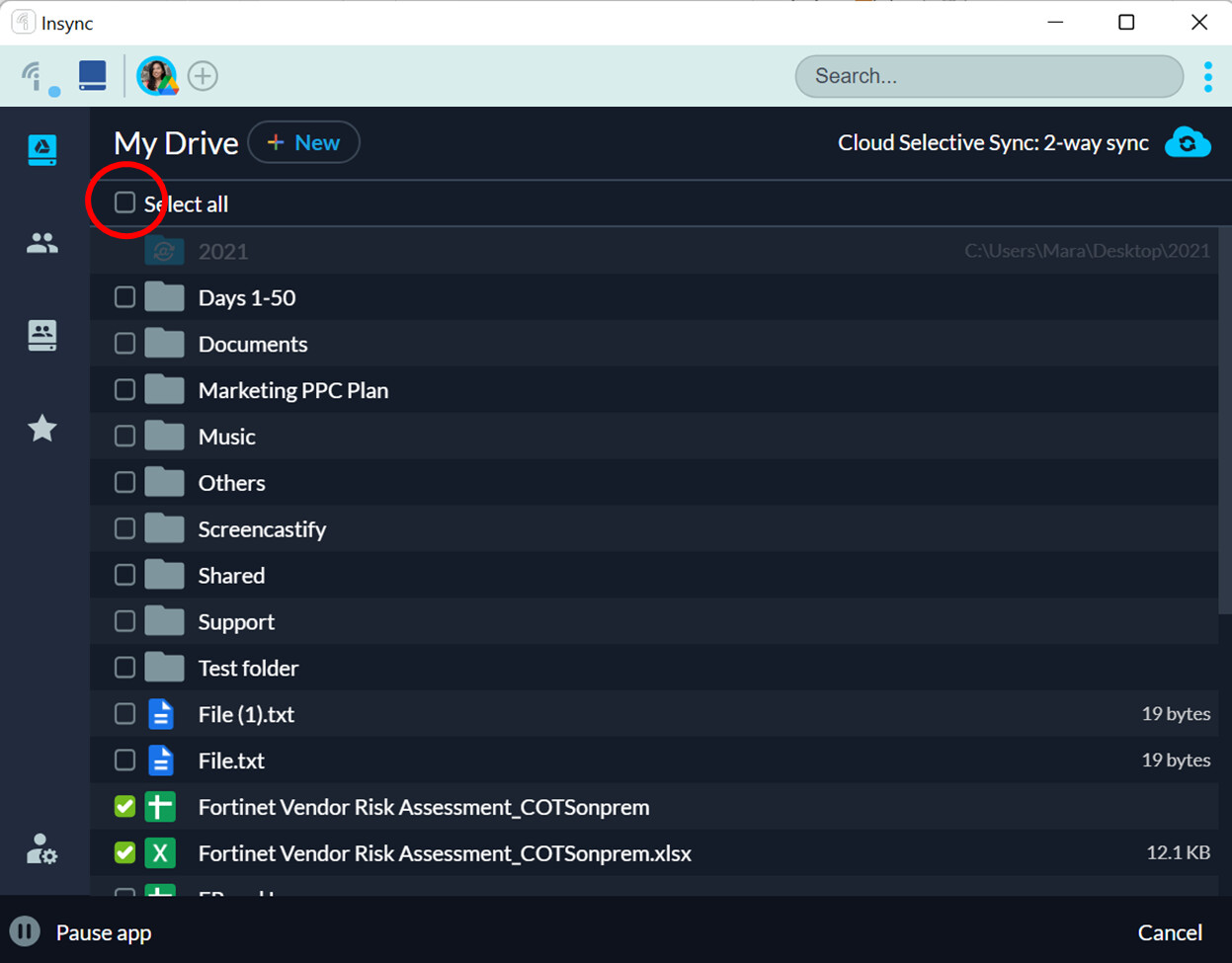
It seems like you used a folder with contents already present. This leads to file-matching, where Insync checks what’s present locally and in the cloud, making sure no files are missed or skipped. When Insync downloaded everything, did it create duplicates? If not, do you recall clicking Select All while setting up your account, as shown below?
The issue on the subdirectory sounds like really frustrating. Does this happen to other folders as well (i.e., newly added items in the cloud are not syncing down)? Please send the following to support@insynchq.com after quitting Insync:
- logs.db
- out.txt
Your logs should be in ~/.config/Insync.
Thank you very much!