Hi,
This error showed up today on my Windows 11 installation.
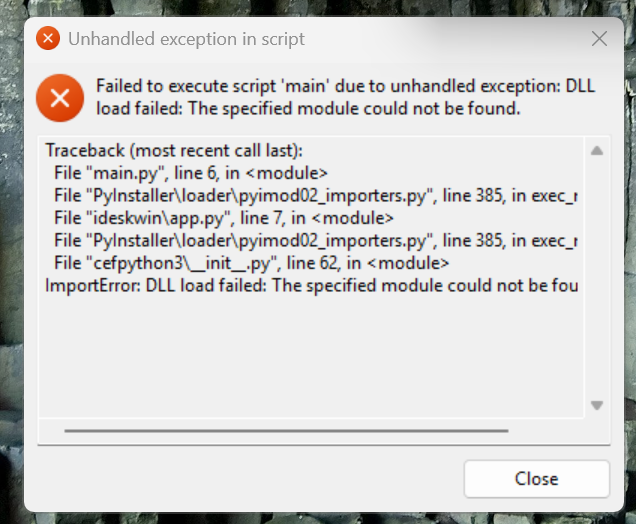
I’ve tried reinstalling insync, the VC++ redistributable, Python.
How do I fix this?
Thanks!
Hi,
This error showed up today on my Windows 11 installation.
I’ve tried reinstalling insync, the VC++ redistributable, Python.
How do I fix this?
Thanks!
My apologies for the trouble! Let me forward this to our engineers for further assistance.
I just wanted to say I am experiencing the same issue. I also updated python thinking that would fix this. Did not work. But downgrading to an older version that i had in the downloads folder did work.
I have escalated this issue to our engineers. In the meantime, please download 3.8.7.50505 via this Google Drive link and let me know if the issue arises: https://drive.google.com/file/d/1VnDr8wmGKaHKUOPWWDKIYhoiFsgKSSS9/view?usp=sharing
No, it is not working. Both versions arises same error:
Traceback (most recent call last):
File “main.py”, line 6, in
File “PyInstaller\loader\pyimod02_importers.py”, line 385, in exec_module
File “ideskwin\app.py”, line 7, in
File “PyInstaller\loader\pyimod02_importers.py”, line 385, in exec_module
File “cefpython3_init_.py”, line 62, in
ImportError: DLL load failed: %1 no es una aplicación Win32 válida.
Hello all. Our engineers are investigating this and will be releasing a build that affected users can test.
@Juan_Jose_Aguado, could you send your logs.db file to support@insynchq.com? This is in %AppData%\Insync.
OK, I had this exact problem; same errors; it started around the time I had installed the latest python environment. But not certain if that was the issue.
However, after searching thru the registry, I did not find any of these files mentioned in the registry.
So I resorted to uninstalling insync, then reinstalling the latest version, but NOPE, same problem.
Next I tried again to uninstall insync.
Then searched thru the C: drive and deleted every item found that had insync folder or files.
Then rebooted. Then downloaded the version 3.8.7.50505 via the link and installed it.
THIS WORKED FOR ME.
NOTE: after I restored the insync folder for my google drive as it was not there after I had reinstalled. Not sure what happened to my google drive folders/files but I was easily able to restore them.
Always have a backup plan to restore your files if something goes wrong somewhere and like me not sure how it happened?
Hello everyone. Please download the new Windows build here (v3.8.11.50511) and let us know how it goes.
Thank you!
Hi! If you removed every item that had Insync folder/files in it and you were using the default base folder path, it’s possible that it was also deleted during this process. It’s something like ~/Insync/username/Google Drive 
3.8.7.50505 behaves, but 3.8.11.50510 produces exactly what luis2 mentioned above
Hi @Adrian_Bradu, kindly try the build I linked here. Thank you!
I upgraded to 3.8.11.50511 - looks OK, no error messages 
Thanks
Very possible that I deleted my own insync data store in my process. That’s why I keep a monthly backup in case I need to restore this insync data folder and not clog up the internet pipeline by restoring my backup data first.
The specific .dll file I found that was active and not allowing to be deleted until I unregistered it first is “InsyncShellExtensions64.dll”.
One other thing I tried was looking up all of these entries listed as items failing in the script in the registry but did not find any of them in the registry; also never found a .py script that had any of these mentioned scripts and line errors of the fault.
Hi @Dave_Oliphant, glad to hear that you have a backup.
There was a minor build issue with 3.8.11.50510 and it wasn’t working for a few Win 10/11 users due to a missed library/module which has been added back in the latest build. Let me know if encounter any other issues with it.