Hi,
I’ve been using Insync to bring keep a small number of files and folders for several years on a number of Linux machines.
After a recent installation of Kubuntu 24.04 I’ve found that v3.9.6.60027 permanently shows the files I’ve selected with the two arrow (sync in progress) icon.
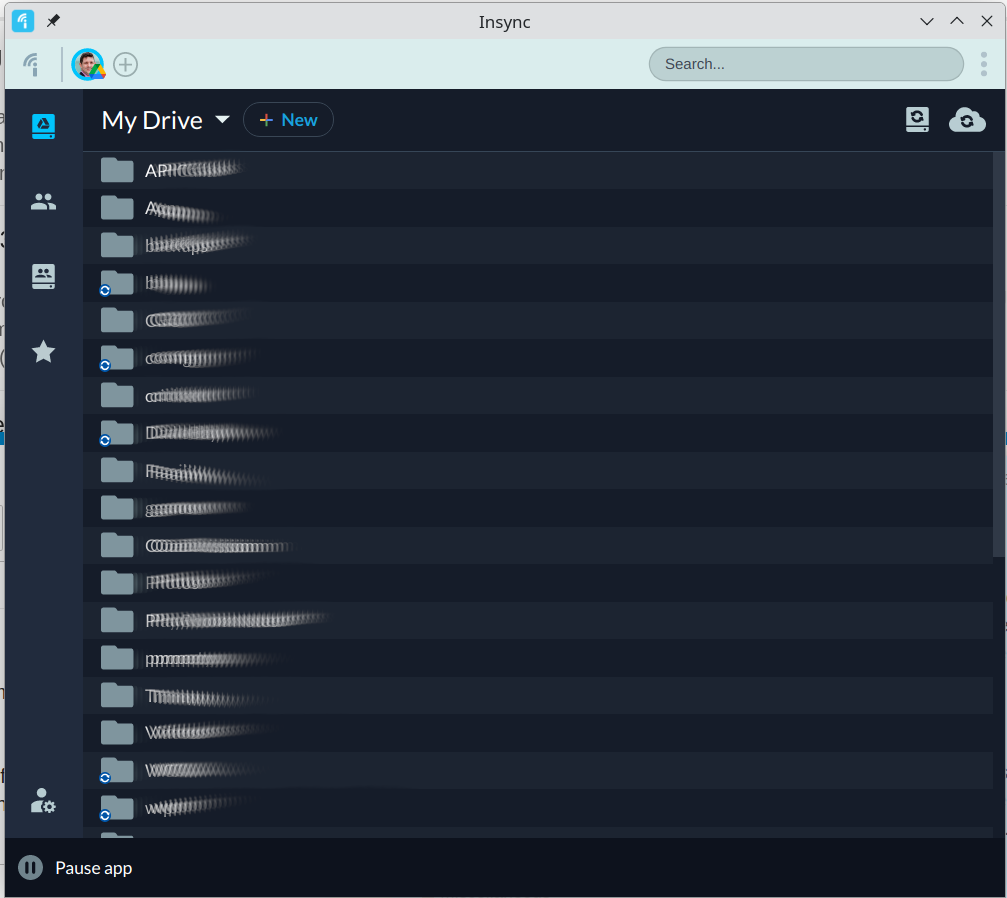
I managed to ‘trick’ it into syncing once by clicking the 2-way sync button at the top of the window but this now seems to setup a new folder.
I did wonder if it is just the UI but no, I have created new files server side and client side in synced folders and they are never synced.
The log file contains many similar messages such as below if that helps?
js: Access to XMLHttpRequest at 'https://us.i.posthog.com/decide/?v=3&ip=1&_=1755452496989&ver=1.110.0' from origin 'file://' has been blocked by CORS policy: The value of the 'Access-Control-Allow-Origin' header in the response must not be the wildcard '*' when the request's credentials mode is 'include'. The credentials mode of requests initiated by the XMLHttpRequest is controlled by the withCredentials attribute.
js: Access to XMLHttpRequest at 'https://us.i.posthog.com/decide/?v=3&ip=1&_=1755452498432&ver=1.110.0' from origin 'file://' has been blocked by CORS policy: The value of the 'Access-Control-Allow-Origin' header in the response must not be the wildcard '*' when the request's credentials mode is 'include'. The credentials mode of requests initiated by the XMLHttpRequest is controlled by the withCredentials attribute.
js: Access to XMLHttpRequest at 'https://us.i.posthog.com/decide/?v=3&ip=1&_=1755452496989&ver=1.110.0&retry_count=1' from origin 'file://' has been blocked by CORS policy: The value of the 'Access-Control-Allow-Origin' header in the response must not be the wildcard '*' when the request's credentials mode is 'include'. The credentials mode of requests initiated by the XMLHttpRequest is controlled by the withCredentials attribute.
js: Access to XMLHttpRequest at 'https://us.i.posthog.com/decide/?v=3&ip=1&_=1755452498432&ver=1.110.0&retry_count=1' from origin 'file://' has been blocked by CORS policy: The value of the 'Access-Control-Allow-Origin' header in the response must not be the wildcard '*' when the request's credentials mode is 'include'. The credentials mode of requests initiated by the XMLHttpRequest is controlled by the withCredentials attribute.
js: Access to XMLHttpRequest at 'https://us.i.posthog.com/decide/?v=3&ip=1&_=1755452496989&ver=1.110.0&retry_count=1&' from origin 'file://' has been blocked by CORS policy: The value of the 'Access-Control-Allow-Origin' header in the response must not be the wildcard '*' when the request's credentials mode is 'include'. The credentials mode of requests initiated by the XMLHttpRequest is controlled by the withCredentials attribute.
js: Access to XMLHttpRequest at 'https://us.i.posthog.com/decide/?v=3&ip=1&_=1755452498432&ver=1.110.0&retry_count=1&' from origin 'file://' has been blocked by CORS policy: The value of the 'Access-Control-Allow-Origin' header in the response must not be the wildcard '*' when the request's credentials mode is 'include'. The credentials mode of requests initiated by the XMLHttpRequest is controlled by the withCredentials attribute.