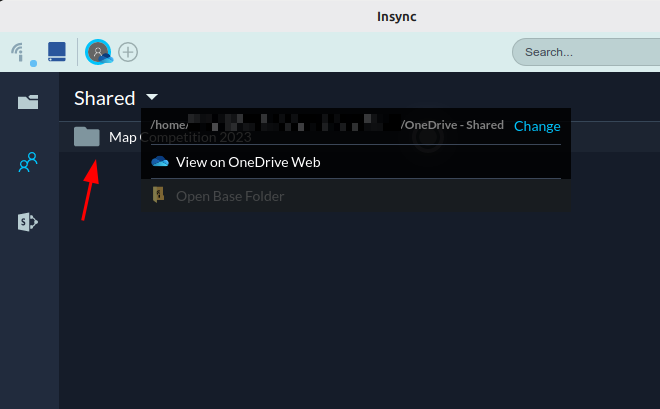
I’m having an issue with Insync not recognizing my OneDrive Shared Folders.
OneDrive itself recognizes all my shared folders normally (they appear in the web interface), but Insync only shows one of them. The other shared folders don’t appear in the Insync interface at all.
Additional notes:
I already removed my OneDrive account from Insync and added it again.
I also reinstalled Insync completely.
The problem persists: Insync does not create the local shared folders and doesn’t list all the shared folders available in OneDrive.
It seems like more and more users have started to report this issue, which I’ve already escalated to our engineers. I’ll make sure to diligently follow up with them so we can solve this as soon as possible. @faustoisolan, could you send the following to support@insynchq.com:
logs.db
out.txt
Screenshot of OneDrive web vis-a-vis what’s visible on Insync under Shared
@raulgrangeiro We sincerely apologize for the lack of updates from our end! Rest assured that I have requested our engineers to really look into this so it can be resolved as soon as possible.
I experienced the same issue a few years ago. It was eventually resolved only when I reinstalled my operating system (for unrelated reasons) and set up Insync again from scratch.
Unfortunately, about a week ago I started experiencing the same problem again, although with some differences compared to the previous case. Back then, I could see my shared folders in the Insync interface, but when I attempted to sync them, they would download locally and then disappear from the disk after a random period of time.
Now I’m facing the same situation described by the first user: the shared folders don’t even appear in the Insync interface.
I understand that Microsoft may have made changes to their API that are affecting Insync’s functionality, although other clients like abraunegg/onedrive continue to work correctly.
For now, I’ve stopped using Insync with my Microsoft account. I was hoping that the new 3.9.7 version would fix the issue, but from your message it seems that’s not the case.
Thank you, Fausto, for reporting the problem, and thanks to Mia and the engineering team for working on a solution. Hopefully it will be resolved soon so we can continue using this great alternative you provide for Linux users.
Additional notes:
I already removed my OneDrive account from Insync and added it again.
@tafol Many thanks for the detailed report, and my sincerest apologies for the huge trouble. Indeed, there have been a few issues when syncing OneDrive shared folders such as what you previously experienced. I will make sure to diligently follow up on this so we can fix it as soon as possible.
Any news on this? I have the same problem (with insync_3.9.7.60031-questing_amd64.deb on Ubuntu 25.10): my OneDrive cloud folders show in the insync app (and in the designated local synchronization folders), but the shared folders don’t show in the insync app and, very annoyingly and worryingly, the shared folders just now disappeared from the local synchronization folder!
Hi Mia,
Do please send it sooner rather than later.
All the folders and files previously in my insync shared folder were suddenly in the computer’s Trash.
Also, logging in to OneDrive via the “View on OneDrive Web” link under the Shared dropdown menu does not work. It takes me to a login.live.com web address, where logging in to the microsoft account terminates with the message:
Something went wrong
We’re sorry, sign-in isn’t working right now. But we’re on it! Please try again later.
Are the engineers actively working on this specific problem?
Have they already identified the root cause?
I wanted to let you know that I may have found some useful technical information that could help open a new line of investigation. I’ve managed to restore full synchronization of my shared folders using another Linux OneDrive client called abraunegg/onedrive, and the behavior I observed might be relevant for Insync as well.
Summary of the workaround with abraunegg/onedrive
SharePoint shared folders only start syncing correctly after:
Manually creating a shortcut to the folder inside “My Files” on the OneDrive web interface.
Adding the exact shortcut name to a whitelist (case-sensitive, including accents and spaces).
Forcing a full resync.
Detailed background
Some of the folders that previously synchronized without issues are SharePoint folders from Microsoft Teams channels where:
I am a member of the team and the channel
I have edit permissions
I had also explicitly shared these folders with myself
Because of this, they appeared correctly under: OneDrive Web → Shared → Shared with me,
and Insync also detected them properly in the past.
Current problematic behavior
These folders:
Did not appear using any shared-items listing command
Did not sync, even though I am a team/channel member with edit rights
Were not listed by onedrive --list-shared-items
Returned no valid ID with --get-sharepoint-drive-id
Working alternative solution (abraunegg/onedrive)
Manually add a shortcut to “My Files”
From OneDrive / SharePoint web:
Open the folder
Click “Add shortcut to My files”
This makes the folder appear physically inside my personal OneDrive root instead of only as a remote SharePoint library.
Add the exact folder name to the whitelist
The whitelist must match the shortcut name exactly (case, spaces, accents):
nano ~/.config/onedrive/sync_list
Example:
/NoCompartit
/Departament de Tecnologia
/Àmbit científicotecnològic 1ESO
Force a full resync
pkill onedrive
onedrive --resync --sync
Enable continuous sync
onedrive --monitor
Conclusion
SharePoint channel folders only seem to sync reliably on Linux clients after:
Manually creating a shortcut inside “My Files”, and
Using that exact shortcut name in the whitelist.
Since abraunegg/onedrive is open-source software, your engineers can freely inspect its internal implementation and analyze in technical depth how it handles these SharePoint shortcuts and shared items, going far beyond what I can observe as a non-developer user. This might help identify where the behavior currently differs from Insync’s implementation and lead more quickly to a proper fix.
Thank you again for your continued support and for following up on this issue.
Thank you for the very detailed update, @tafol! I’ve sent this to our engineers and I will update this thread as soon as I’ve received more info from them-- not just about your report but the overall progress of the investigation.
I have the same issue on Debian 13 and Insync 3.9.7.60031-trixie. I reached out to support last Nov when the issue started happening but have not heard back. Has anyone found a similar workaround for Insync (creating shortcut, adding to whitelist and forcing a resync)?
Hoping that there are some movements on this issue. It’s beginning to really affect our internal workflow, and we are considering a switch to the open source client.
Our sincerest apologies for the long wait. We can see how frustrating it has been for a lot of you-- rest assured that this is under priority investigation and will be sharing updates as soon as possible.
I have had the same issue since yesterday. Everything was working well, but suddenly folders and files disappeared from the Insync ‘Shared’ tab on my OneDrive account. Some files and subfolders have disappeared from the base folder. Hopefully they are still in the cloud, but this behaviour is worrying. Please, provide some solution soon.
I have just checked our OneDrive account and nothing seems to have backed up successfully since December. The reason we pay for InSync is because we rely on the devs to fix problems when they arise.
Can somebody tell us what is happening to fix the problem of files not uploading (backing up) to OneDrive?